

APImetrics API Overview
The REST API can be used alongside the CLI and configuration as code to automate monitoring setup in your CI/CD pipeline.
Key Concepts
Anything you can do with the User Interface, you can do via monitor. We also have sample Python code available on GitHub.
- Create monitors
- Edit existing calls
- Create and manage authentication settings
- Access reports and statistics
- Pass through variables and other items
- Create and manage workflows
A full list of the monitors with examples can be found in the API reference section.
Generate an API Key
Under the 'Advanced' options in the navigation, select 'APImetrics API' and generate an API Key.

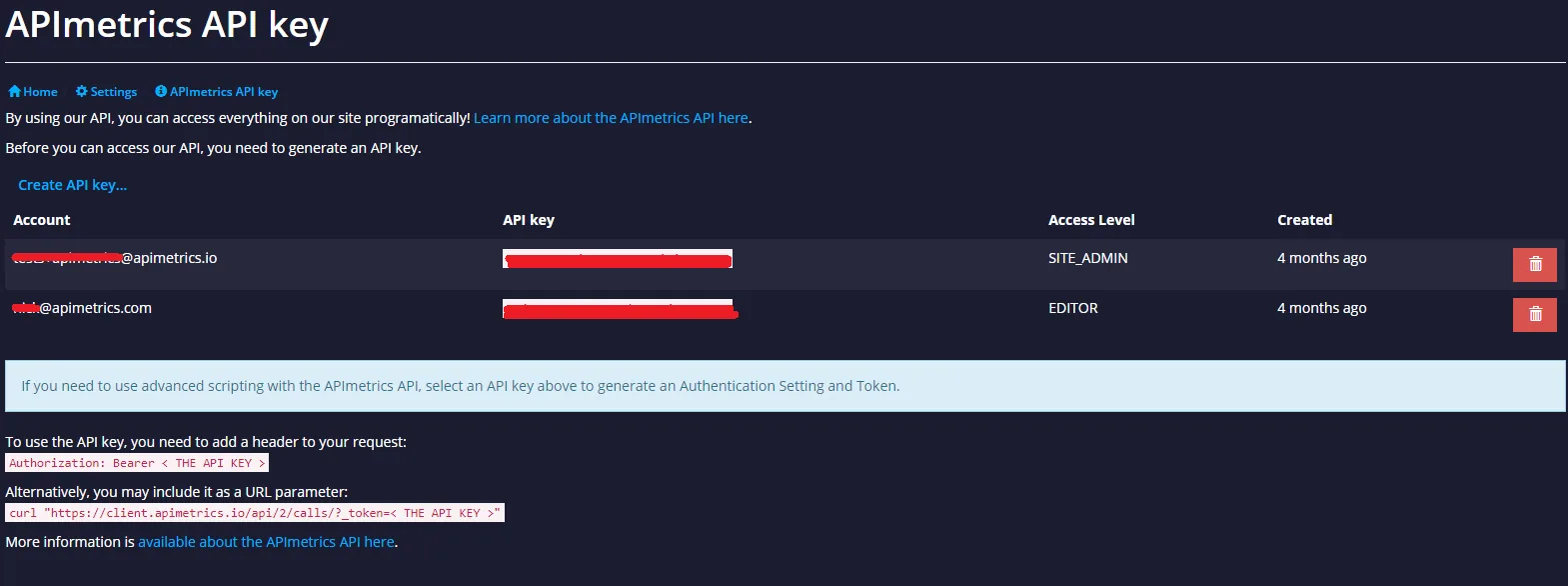
Once generated the API Key can be used as a parameter or a header item.
GET /path HTTP/1.1
Authorization: Bearer API_KEY
Replace "API_KEY" with your actual key.
Generate Auth Settings
To automate the process of adding your API key to the API Authentication settings:
- Click
Generate Auth Settingsin the dialog box that appears when you click on the newly created API key. - Click
View generated Authentication Settingsto navigate to the Authentication and Token settings page.

Note that when developing using our API, you can also specify a query parameter "debug=1" which will enable pretty-printing of the JSON results.
Generate an Access Token
Use the Client ID and Client Secret (for example, from a Service Account) to generate an OAuth access token:
curl -X POST "https://auth.apimetrics.io/oauth/token" \
  -H "Content-Type: application/json" \
  -H "Accept: application/json" \
  -d '{
    "grant_type": "client_credentials",
    "client_id": "<your-client-id>",
    "client_secret": "<your-client-secret>",
    "audience": "https://client.apimetrics.io"
  }'
A successful response will look like this:
{
  "access_token": "<access-token>",
  "expires_in": 3600,
  "token_type": "Bearer"
}
Use the returned access_token as a Bearer token in the Authorization header when calling API endpoints:
Authorization: Bearer <access-token>
Example API request:
curl -X GET "https://client.apimetrics.io/<api-endpoint>" \
  -H "Accept: application/json" \
  -H "Authorization: Bearer <access-token>"