

JSON: advanced features - filtering a list & returning a value
Overview
You have an item that is returned in a JSON list but rather than being in a specific location in the list i.e. foo.[2].bar - it could be in any location in the list. Using a filter to identify the item, and then extracting that as a variable is how we handle this scenario.
Summary
The Assertion checks syntax uses a cut-down version of the Jinja templating library to parse the data, which allows for some filters (marked by |) and tests as well as the direct dot-notation syntax.
For example, consider the following JSON:
{
  "headers": [
    {
      "key": "Content-Type",
      "value: "application/json"
    },
    {
      "key": "Interaction-Id",
      "value: "123456789123456789"
    },
    {
      "key": "X-APImetrics-Id",
      "value": "asdfasdfasdfasdf"
    }
  ]
}
In this JSON, the headers are in a list. If that list is always in the same order, you can use the regular notation to find the value associated with the key Interaction-Id:
headers[1].value
However, if this list is not in a guaranteed order, you need to use filters and tests to get the value you require.
In the above example, to get the Interaction-Id, you'd use the following assertion:
headers|selectattr("key", "eq", "Interaction-Id")|map(attribute="value")|first
To explain:
- the
selectattrfilters the list of header objects where the object has an attributekey, that is equal toInteraction-Id- this will reduce the headers list to the a list containing the one matching item - the
mapwith attribute extracts the value for the filtered list - this will leave a list with one item that is the value we want - the
firstreturns the first item in the list
For the full list of filters and tests, see the JSON filters and tests reference.
Use Case
In this example, we have a sample returned JSON list where we want to find the Interaction ID and extract that as a variable for use in another call.
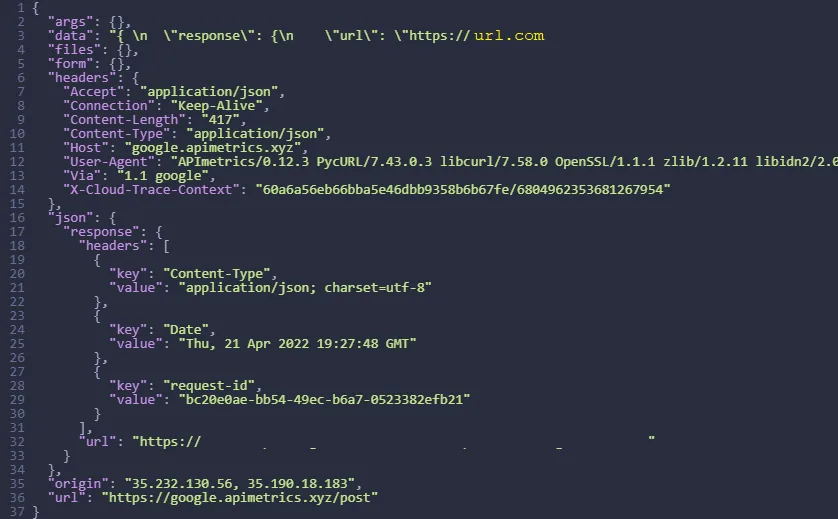
The first step is to set up an assertion check to create a filter and check that the item exists.
We do this in the 'assertions' section of the API edit pane.
json.headers|selectattr("key", "eq", "Interaction-Id")|map(attribute="value")|first
We set the ASSERTION to test it exists using the filter string in the test, thus:

We then add the command to EXTRACT the value: First we set the search criteria to find the value Interaction id.
json.headers|selectattr("key", "eq", "Interaction-Id")|map(attribute="value")|first
And then set the EXTRACT conditions to set the variable you use.

Your assertions section of the edit pane should look something like this:
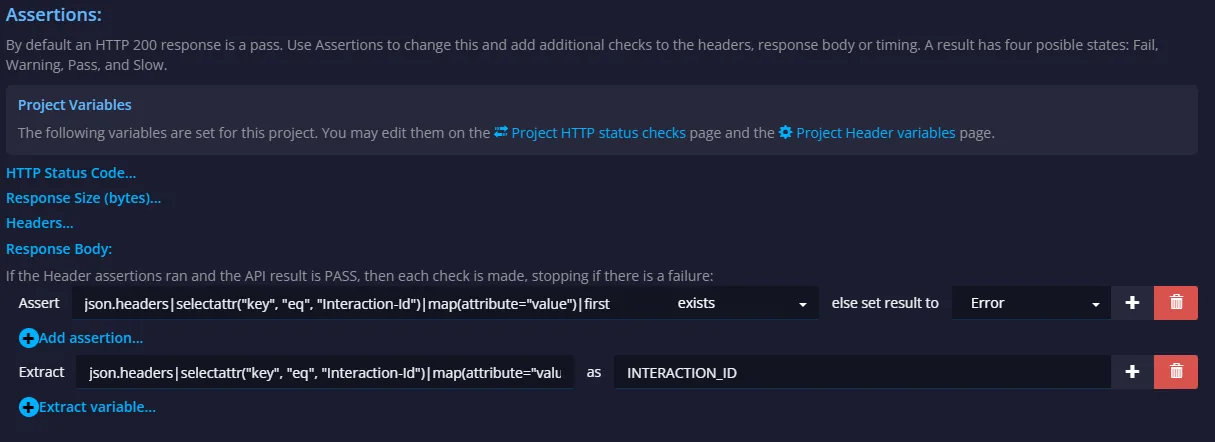
When the monitor is run, the variable INTERACTION_ID is set to the value of the Interaction id in the returned JSON.
This can be used in another call in a workflow using %%INTERACTION_ID%% or INTERATION_ID